
What Is a Power Supply Unit (PSU) and How to Choose One
A PSU changes wall power into safe power for your computer, and this guide shows you how to choose the correct one and when you need a backup.
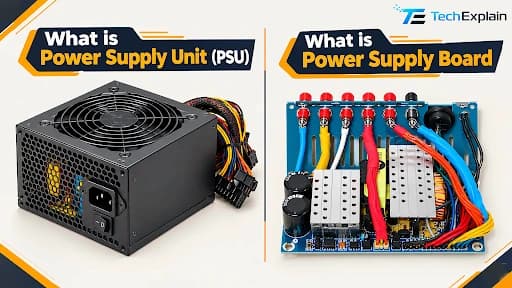
A Power Supply Unit (PSU) is an internal hardware component that converts high-voltage alternating current (AC) from a wall outlet into low-voltage regulated direct current (DC) required by a computer's internal parts.
Every computer or server needs a reliable source of power to run properly, and that's precisely what a Power Supply Unit (PSU) is built for. Even though its name suggests it "supplies" power, a PSU actually works as a converter—it takes the electricity coming from your wall socket and turns it into a safe, usable form that your computer's parts can handle. This process involves converting AC (alternating current) into DC (direct current) and keeping the voltage steady and accurate so components like the CPU, motherboard, and storage drives always get the right amount of power.
In this guide, we'll break down everything you need to know about PSUs—from how they work and why they matter to how to pick the right one for your system, understand efficiency ratings, and decide whether you need more than one power supply for extra reliability.
PSU Clarification:
A PSU converts electrical power from an external source into usable DC power for the internal components of a computer, server, or other electrical device. Its primary role is to convert electricity into a reliable form of power rather than simply supplying power to the device.
What Is the Role of a PSU in a Computer or Server?
A Power Supply Unit (PSU) is a part found inside every computer and server. Even though its name makes it sound like it "gives" power, its real job is to change power into a form your computer can actually use. It takes the AC (alternating current) power that comes from your wall socket and turns it into DC (direct current) power, which is what computer parts need to run. It also keeps this power steady and at the right level, so parts like the CPU and motherboard always get safe, stable power.
Most PSUs use a design called a switched-mode power supply (SMPS). This makes them more efficient and lets the same PSU work in different countries, even though power systems are not the same everywhere. For example, the UK uses 240V at 50Hz, the USA uses 120V at 60Hz, and Australia uses 230V at 50Hz—and a good PSU can handle all of these without any problem.
What a PSU Does
A PSU (Power Supply Unit) is a part inside your computer that changes electricity so your computer can use it. Your wall socket gives AC power, but computer parts need DC power, so the PSU converts AC to DC and keeps the voltage steady and safe. It also works in different countries, handling voltages like 240V in the UK, 120V in the USA, and 230V in Australia. In 2026, many PSUs use GaN (Gallium Nitride) instead of old silicon parts, wasting less energy, running cooler, and staying quieter. GaN also makes PSUs smaller while staying powerful, and new units support the 12V-2x6 connector, which safely handles sudden power spikes from high-end GPUs like the RTX 50 series.
Simple Comparison
Old PSU (Silicon) | New PSU (GaN, 2026) | |
Wastes energy as heat | More | Less |
Efficiency | ~90% | ~94% |
Noise | Louder | Quieter |
Size | Bigger | Smaller |
Good for new GPUs | Okay | Much better |
Why a Weak PSU is Risky
A low-quality or underpowered PSU is like an unhealthy heart—it struggles to keep up and causes problems throughout your system. It can lead to unexpected shutdowns and reboots when your computer is under heavy load, since it simply can't supply enough stable power. It can also cause voltage fluctuations that damage sensitive parts like your motherboard, storage drive, or graphics card. Over time, the extra strain wears out both the PSU and other components faster, shortening their overall lifespan. In 2026, this problem has become even more serious because modern GPUs (like the RTX 50 series) create sudden power spikes that older or cheap PSUs simply can't handle—leading to random crashes or hardware damage. Moreover, weak PSUs waste more electricity as heat instead of using it properly, which quietly increases your electricity bill over time.
How to Pick the Right PSU for Your System
Picking the right PSU isn't complicated once you know what to look for. First, make sure the PSU is compatible with the form factor of your case and motherboard, since server cases and standard PC cases often use different PSU sizes and connectors—this ensures it actually fits and connects properly.
Wattage is the next important factor. The rule of thumb is to calculate how much power your components actually need, then choose a PSU with extra headroom above that. For example, if your system needs around 600W to run smoothly, going for a 1200W PSU is a smart choice, since most PSUs run at their highest efficiency when operating around 50% load. This also gives you room to upgrade or add more components later without needing to replace the PSU again.
Brand and efficiency rating matter too. Well-known names like Corsair, Antec, EVGA, and Seasonic have a strong track record for reliability and safety. Your final choice usually depends on your budget, what you're using the system for (gaming, business, or personal use), and compatibility with your existing setup. A good tip is to look for an 80 Plus Platinum rating, since it means better energy efficiency and lower electricity costs over time.
It's also worth checking for ATX 3.1 compliance, since modern GPUs (like the RTX 50 series) create sudden power spikes that older PSUs can't handle safely. The 12V-2x6 connector is another good thing to look for, as it's a safer, upgraded version of the older 12VHPWR connector with reduced overheating risk. If efficiency and low noise matter to you, GaN-based PSUs are also a great option since they run cooler, and quieter and waste less energy as heat compared to older silicon-based designs.
What efficiency rating should I look for?
Power suppliers rated on a scale called 80 Plus, which starts at 80 Plus and Bronze and goes all the way up to Titanium. This rating just tells you how much power the PSU wastes as heat — "80 Plus" means it's at least 80% efficient, and the higher you go (Platinum, Titanium), the better it gets, reaching around 94% efficiency at 50% load. Higher-rated PSUs like Gold, Platinum, and Titanium are mostly used in big data centers because they handle more power and save more energy, while Silver and lower-rated PSUs (up to about 88% efficiency) are perfectly fine for normal home PCs. Even a small difference, like going from 90% to 92% efficiency, can save a lot of electricity when used across thousands of servers in a data center. For very demanding setups like AI servers, there's now an even higher rating above Titanium called "80 Plus Ruby," which reaches about 96% efficiency. Some companies also use another rating system called Cybenetic, which tests PSUs more thoroughly across different power levels and gives a more realistic idea of how efficient a PSU really is in everyday use.
Do I Need Multiple Power Supplies?
In short, yes—a server usually needs at least two power supplies to keep running safely. There are two common ways to set this up, depending on how much backup protection your system needs. One option is to have a fully backup-ready setup, where one power supply is actively running the system while the second one stays off and only turns on if the first one fails. The other option is to have both power supplies running together at the same time, sharing the work between them. A good rule of thumb is to choose power supplies that together provide about double the power your system actually needs—this helps keep everything running smoothly even if one of them stops working.
For extra protection, it's also a good idea to use an Uninterruptible Power Supply (UPS). A UPS lets your system keep running for a short time if the main power goes out completely. There are three common types. An online UPS keeps the power steady all the time with no break at all. An offline UPS only turns on after the power goes out, so there's a very short delay before it takes over. A line-interactive UPS is a mix of both, and it also helps smooth out small power problems, giving even better protection.
Many modern servers also use power supplies that can be swapped out while the server is still running, so a broken one can be replaced without shutting anything down. Some newer power supplies can also be monitored remotely, showing details like temperature and health status, so problems can be spotted early before they cause a shutdown. On the UPS side, many devices have also moved from older, heavier batteries to lighter, longer-lasting battery technology, and some newer UPS systems can even warn you in advance if a battery is starting to wear out.
Frequently Asked Question
What does a PSU actually do?
A PSU takes electrical power and changes it into safe, usable DC power for the parts inside a computer or server. It doesn't just give power—it changes and controls it.
Why is a weak PSU risky?
A cheap or underpowered PSU can cause your computer to shut down suddenly; damage parts like the motherboard or GPU due to unstable power; wear out your hardware faster; and waste more electricity, raising your bill.
What's different about GaN-based PSUs?
GaN PSUs waste less power as heat, run cooler and quieter, and are smaller than older silicon-based PSUs, while also reaching higher efficiency (around 94% compared to 90%).
What should I check when choosing a PSU?
Make sure it fits your case and motherboard, pick the right wattage with some extra room to spare, and choose a trusted brand like Corsair, Antec, EVGA, or Seasonic with a good efficiency rating like 80 Plus Platinum.
What does the 80 Plus rating mean?
It shows how efficient a PSU is, going from 80 Plus up to Titanium—the higher the rating, the less power it wastes as heat. For very demanding systems, there's now an even higher rating called "80 Plus Ruby," reaching about 96% efficiency.
Do servers need more than one PSU?
Yes, servers usually need at least two power supplies, so if one fails, the system can keep running without shutting down.
What is a UPS, and why does it matter?
A UPS keeps your system running for a short time if the power goes out completely. There are three types—online, offline, and line-interactive each giving a different level of protection.
Conclusion
A PSU might look like a small, simple part, but it plays a big role in keeping your computer or server safe and running smoothly. Picking the right one—with the correct size, enough wattage, and a good efficiency rating—helps avoid crashes, hardware damage, and extra electricity costs. Newer GaN-based PSUs are also a smart choice since they run cooler, quieter, and more efficiently and support today's high-power GPUs. For servers, using more than one PSU along with a UPS gives extra protection and helps keep everything running with little to no downtime.
Share this article
Related Articles

How to Choose the Right Graphics Card: A Simple Guide for Everyone
A simple guide to picking the right graphics card for your needs.
SSD vs HDD: Which Storage Is Right for You in 2026?
SSDs win on speed, HDDs win on price — pick based on what you actually need to store.
CPU, RAM, and Storage: How They Work Together
The CPU thinks, RAM helps it work quickly by holding what's needed right now, and storage keeps all your files saved for later.