
Public Wi-Fi Safety: Risks and How to Stay Protected
Free WiFi is risky because hackers can steal your data through weak security and fake hotspots, so use a VPN and avoid banking or work logins on public networks.
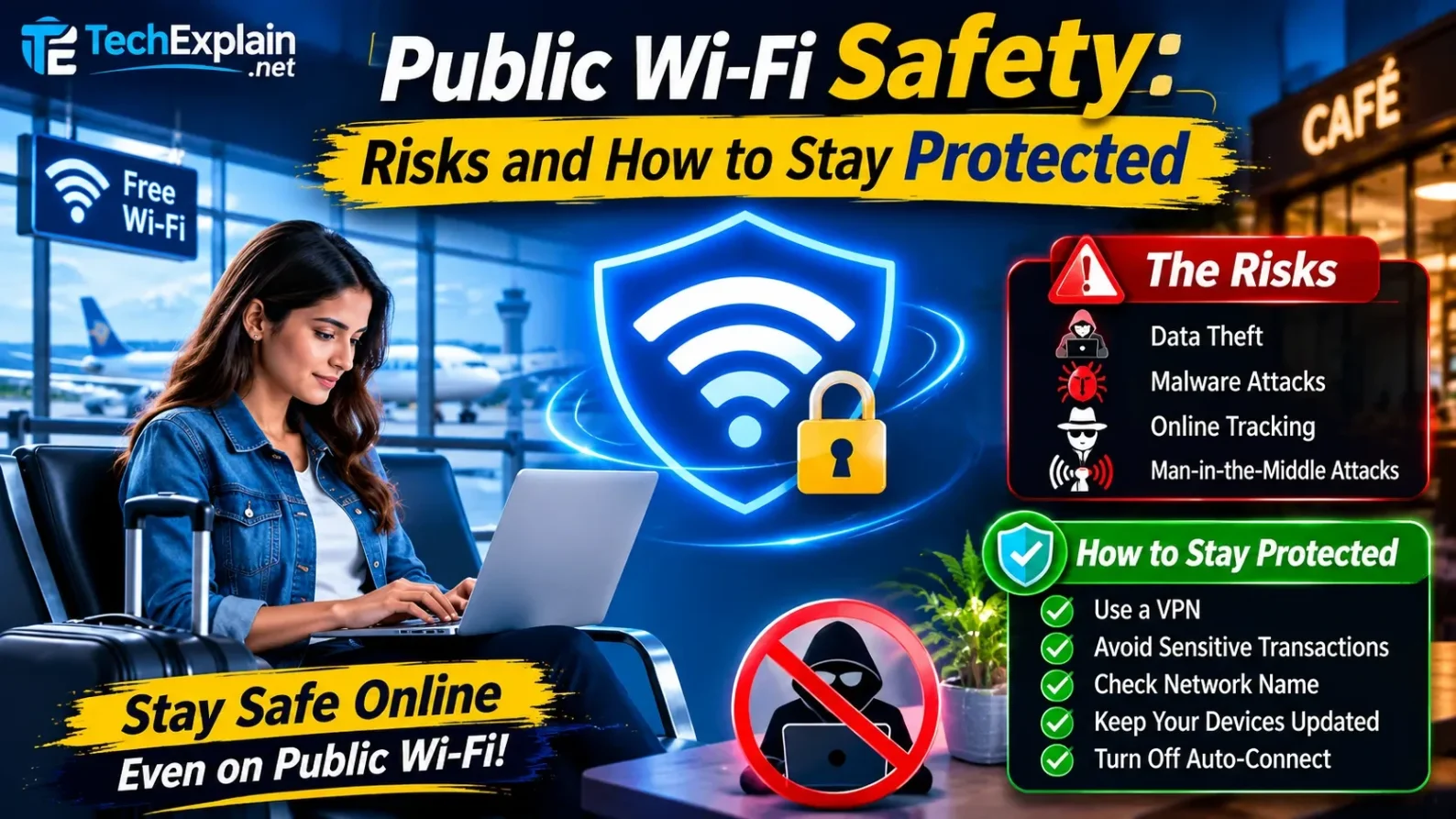
Public Wi-Fi networks expose your device to data interception and cyberattacks because they typically lack strong encryption
In today's world, free WiFi has become an inseparable part of our everyday life. You can easily connect to the internet via WiFi in coffee shops, shopping centers, airports, and even hotels. But the accessibility of the WiFi network makes it vulnerable to attacks because there are always people who don't care about their privacy. Therefore, no matter whether you are a student, an employee, or even a businessman, it is vital to know how public WiFi networks work, the threats that accompany them, and how to prevent any harm. Let's have a closer look at free WiFi dangers and safety measures.
What Do We Mean by Free WiFi?
Free WiFi stands for an internet connection that is free to access for anyone and does not cost a cent to use. Usually, free WiFi is available at cafes, malls, schools, transportation hubs, and hotels. These networks lack many of the protective features provided by private networks. In the vast majority of cases, there is no need to enter any password to gain access to such a network. This feature is extremely convenient for users but is also highly attractive to malicious actors.
Over 60% of smartphone users connect to free WiFi networks on a regular basis and do not bother checking their security status. That is why free WiFi has become a primary target for hackers.
What Is an Unsecured Network?
An unsecured network is a wireless network in which one does not have to provide credentials, like a password or otherwise, before connecting. This network lacks encryption, which means any individual within range is capable of gaining access to the network and capturing the information transmitted over it.
Here are some things to note down. First, it is a password-free network, which means anybody can connect to it. Second, it doesn't encrypt your data, which makes it possible for hackers to analyze and steal your data, which includes passwords, emails, and messages. Lastly, the security threat level increases here, since devices that are connected to such a network are at increased risk of being attacked by viruses, malware, and hackers.
An easy trick is to never exchange any sensitive information on an unsecured network. Some of the best ways include the usage of either a virtual private network
Why Is Free WiFi Risky?
By definition, free WiFi networks should be easy to connect to but not too difficult to breach. Multiple users work with one WiFi, making it easy for intruders to abuse weak security settings and eavesdrop on, or even get unauthorized access to, communication.
There are three major factors that make public WiFi networks a risky tool to work with.
The first one is that free WiFi lacks encryption. It uses WPA2, which is less secure compared to modern encryption protocols, such as WPA3. The absence of encryption means that attackers will be able to see all the information that passes through the network. It can be anything from credentials to email letters.
The second factor is that WiFi networks are easily accessible to anyone, including malicious actors. They are poorly monitored and provide a perfect environment for launching attacks.
The third factor is the environment itself. Connected devices share the
Most Common Dangers on Free WiFi
Knowing what the dangers associated with free WiFi are will make it easier for you to recognize any signs of danger before anything happens. The following are some of the dangers.
Man-in-the-Middle (MITM) Attacks.
This is where the hacker will place himself or herself in between your gadget and the internet to capture the data being exchanged between you and the internet. You think you are communicating with a certain website directly, but actually, your data passes through the attacker's system.
Evil Twin Hotspots.
Hackers are capable of creating an illusion of a WiFi network that seems like a genuine one. For instance, they name it "Free Airport WiFi." The user, however, connects and provides their information to the hacker.
Packet Sniffing.
Advanced hackers make use of sophisticated software to obtain the plaintext data packets that flow in and out of a network. The data packets may contain usernames, passwords, and personal details.
Malware Distribution.
Another way of stealing data is through malware infection via an open connection.
One out of four people who have used public WiFi networks has experienced some form of security issue.
Lessons About Network Safety
Public WiFi helps us understand the importance of having solid infrastructure and security in networks. Several things go into creating a secure network. The first is encryption, the second is access point management, the third is network segmentation, and the last is firewall protection.
Free WiFi networks have security shortcomings. They concentrate more on having broad coverage and high speeds and less on being secure. This is the reason why they cannot be used for any confidential activity. And this is the very reason why individuals and businesses need to buy reliable networking equipment, like routers and mesh systems.
When Should You Avoid Free WiFi?
The problem of free WiFi is further exacerbated by engaging in actions that involve sensitive information. This could be anything from using online banking or payment services, accessing corporate accounts, accessing one's emails or other forms of online storage systems, to typing in passwords or other personal information.
As per various cybersecurity reports, more than 70% of people have admitted that they carry out sensitive transactions over free WiFi without realizing the risk involved.
Simple Ways to Stay Safe on Free WiFi
Free WiFi is useful if you're on the move. There are a number of good practices that, if followed, can greatly minimize the danger.
1. Use a VPN.
A Virtual Private Network (VPN) ensures that your data is encrypted and becomes inaccessible to any attacker. This happens even if you are using an insecure network.
2. Avoid sensitive transactions.
Try to ensure that you are connected to a secure private network when accessing your banking applications, work applications, or sensitive documents.
3. Verify the network name.
It is important to request the network name from the staff members each time. It is important to avoid hotspots with names that are close to each other, since one of them may not be genuine.
4. Enable HTTPS. HTTPS is used for secure websites and encrypts data that is transferred from your computer to the website server.
5. Turn off auto-connect. Disable auto-connect to WiFi on your device. It prevents your phone or computer from connecting to hazardous networks without your consent.
Keep Your Home Network Safe
For one to be less reliant on public WiFi networks, a safe home network is quite important. Through a properly configured network, you will be able to work, learn, and stream content anywhere in your house and its surroundings without putting yourself at risk of leaking any sensitive information.
To begin with, one should have a secure router. Nowadays, most routers have an option to encrypt a network using the most secure standards, including WPA3. You also need to have your firewall activated. The built-in firewall filters out malicious traffic that might try to breach your network. Additionally, it is important to keep updating your router's firmware at regular intervals. Lastly, you should create a guest network for your guests. This separates them from your network, reducing the security risk but allowing them to connect to the internet easily.
Free WiFi and Private Networks: The Main Differences
Free WiFi is generally poorly encrypted or unencrypted. Access is unrestricted and available to everyone. The security of the data is poor, and the risk level is high.
The case with a private network is quite the opposite. A private network will have strong encryption, like WPA2 and WPA3. Access to the network will be limited to authorized users. Thus, this comparison proves that it is much more secure to use private networks, which are powered by brands we trust.
Better Protection Is on the Way
Public WiFi security is slowly improving. WPA3 is becoming a standard for public hotspots and offers improved defense against password-guessing brute-force attacks, in which cybercriminals keep trying different passwords until the right one is found. Artificial intelligence is also being applied to detect abnormal activity in public networks in real time and neutralize threats at an early stage. However, despite all those advances, public WiFi security remains vulnerable. That is why cybersecurity specialists recommend staying cautious while using public networks, using a virtual private network (VPN), and avoiding activities like banking and working online where possible.
Final Thoughts
Free WiFi is extremely convenient to use; however, it poses some serious dangers that one should be aware of. In case of negligence, the data of both individuals and companies is at risk of being compromised via data theft and malicious software attacks.
If you have enough information about the risks and apply safe practices, you will be able to maintain communication without endangering yourself. Safe practices may include using a VPN, not conducting risky operations, and protecting your home network.
A safe home or office network, created with secure routers and mesh systems, eliminates the necessity to use public WiFi and protects the things that really matter. With a safer connection tool, you will have stable internet on the go.
Safer Choices Instead of Public WiFi
When you require safe internet access when out of the house and need to remain secure, there are safer alternatives to public WiFi. One is mobile data, which is always considered more secure than public WiFi, even when conducting financial transactions or carrying out official activities. In recent times, mobile data has become very affordable and widely available; therefore, it has become a very popular means of accessing the internet, especially 5G and others. The second alternative is a portable 4G LTE WiFi hotspot. What a 4G WiFi hotspot does is allow one to transform his or her SIM card into a private WiFi network. Many 4G LTE WiFi hotspot devices have download speeds ranging from 150 Mbps to 300 Mbps, with LTE-Advanced technology, and also support up to ten devices simultaneously. They are very efficient for personal use, travelling, and serving as a backup for home WiFi, and they do not require using unsafe public WiFi.
FAQs
Is it safe to use public WiFi?
It can be used for normal browsing, but it is not advisable to perform any sensitive tasks using it without taking measures to ensure your safety, such as using a VPN.
Can hackers really see my data on public WiFi?
Yes. Your data may be intercepted without encryption or the use of a virtual private network.
What is an evil twin hotspot?
It is a spoofed WiFi network that resembles an actual one, such as the "Free Airport WiFi" network, and it steals your data after you connect.
How can I check that a WiFi network is real?
Get the network name from the staff, and beware of network names that look similar.
Is mobile data safer than free WiFi?
Yes. It's safer to use mobile data than WiFi, especially when it comes to banking apps and other business activities.
How can I make my own network safer?
It is recommended to use a current router with WPA3, enable the firewall, and update the firmware frequently.
Share this article
Related Articles
What Is Ransomware and How to Protect Yourself
Ransomware locks or steals your files and demands payment to restore them. This guide explains how it spreads and how to stay safe.
What Is Two-Factor Authentication and Why You Need It
Two-factor authentication adds a second security step to your login, so your account stays safe even if your password gets stolen.
How to Create a Strong Password (and Actually Remember It)
Learn how to build a long, memorable password (or passphrase) that's actually hard to crack, plus tips on password managers and two-factor login.